Design & Branding
Why Every Streamer Needs Professional Stream Alerts for Engagement and Growth
Stream alerts may look like small details, but they can have a big impact on how viewers experience your channel. Every follow, subscription, donation, raid, membership, cheer, or tip is a moment where someone interacts with your stream. If that moment feels visible, rewarding, and connected to your brand, it can make viewers feel more involved.
That is why professional stream alerts matter. They are not just pop-up notifications. They are part of your engagement system, your brand identity, and your viewer recognition strategy.
Many streamers focus on overlays, camera quality, lighting, or gameplay layout first. Those things are important, but alerts are one of the few visual elements that respond directly to audience behavior. When someone supports your channel and sees their action highlighted on screen, the stream becomes more interactive.
In this guide, we’ll break down why stream alerts matter, how they affect engagement and retention, what separates basic alerts from professional alerts, and how to use them without distracting from your content.
If you are ready to configure alerts technically after understanding the strategy behind them, you can follow this guide to set up Streamlabs alerts in Streamlabs Desktop.
What Are Stream Alerts?
Stream alerts are visual or animated notifications that appear during a live stream when viewers interact with your channel. They can appear when someone follows, subscribes, donates, becomes a member, sends a super chat, cheers, raids, or completes another important action.
Most stream alerts include a combination of:
- Visual graphics
- Animation or motion
- Sound effects
- Viewer name or action text
- Brand colors or style elements
- Timing and placement on screen
Basic alerts simply notify you that something happened. Professional stream alerts do more than that. They turn viewer actions into branded moments that feel intentional, polished, and rewarding.
For example, a basic follow alert might show plain text and a default sound. A professional alert can match your overlay style, use your channel colors, include smooth motion, and feel like part of your overall stream identity.
Why Stream Alerts Matter for Viewer Engagement
Live streaming is not only about broadcasting content. It is about interaction. Viewers want to feel like they are part of the moment, not just watching from a distance.
Stream alerts help create that feeling because they give viewers immediate recognition. When someone follows or subscribes and their name appears on screen, the stream acknowledges them publicly. That recognition can make the viewer feel seen, appreciated, and more connected to the community.
This matters because engagement is built through small repeated moments. A follow alert, a donation alert, a raid alert, or a subscription alert may only last a few seconds, but those moments can shape the energy of the stream.
Professional stream alerts can help with:
- Recognition: Viewers see that their actions matter.
- Interaction: Alerts create natural moments for the streamer to respond.
- Community energy: Chat can react when someone supports the channel.
- Momentum: Visible actions can encourage more participation.
- Brand memory: Repeated alert visuals make the channel easier to remember.
This is why stream alerts should not be treated as random decorations. They are part of the viewer experience.
How Stream Alerts Can Affect Retention
Retention is about keeping viewers interested long enough to stay, interact, and return later. Alerts can support retention because they make the stream feel alive.
A quiet stream with no visible response to viewer actions can feel static. On the other hand, a stream with clean and well-timed alerts can feel more active, especially when the streamer responds naturally to those alerts.
For example:
- A follow alert gives the streamer a reason to welcome someone new.
- A subscription alert gives chat a reason to celebrate.
- A raid alert can turn a sudden audience spike into a memorable community moment.
- A donation alert can create a personal interaction between the viewer and streamer.
These moments help break up the stream rhythm. They give viewers something to react to and make the broadcast feel less passive.
However, alerts only help retention when they are balanced. If alerts are too loud, too frequent, too long, or visually distracting, they can hurt the viewing experience. The goal is not to interrupt the stream. The goal is to support it.
Professional Stream Alerts vs Basic Alerts
The difference between basic alerts and professional alerts is not only animation quality. The bigger difference is intentional design.
Basic alerts usually work as default notifications. They may be functional, but they often feel generic. They might not match your overlays, stream screens, panels, or brand style.
Professional stream alerts are designed to feel connected to your channel identity. They use consistent colors, typography, animation style, sound, and layout. This makes the alerts feel like part of your stream rather than something pasted on top of it.
| Alert Type | Best For | Main Weakness |
|---|---|---|
| Basic Alerts | Quick setup and beginner testing | Often generic and disconnected from branding |
| Professional Stream Alerts | Creators who want a polished and branded stream | Requires more thought around style and setup |
| Custom Alerts | Established creators with a clear brand identity | Usually requires more time and budget |
For many streamers, professional pre-made alerts are a strong middle ground. They look more polished than default alerts but are easier and faster than fully custom alert design.
How Alerts Support Follows, Subs, and Donations
Stream alerts can influence viewer behavior because they make support visible. When viewers see that follows, subscriptions, donations, memberships, or raids are acknowledged, they understand that participation matters in your community.
Follow Alerts
Follow alerts help welcome new viewers. They give the streamer a natural reason to say hello and make the viewer feel noticed. This can turn a casual visitor into someone who feels more connected to the channel.
Subscription and Membership Alerts
Subscription alerts can make paid support feel more rewarding. A clean and exciting alert can make the moment feel special, especially when the streamer and chat respond warmly.
Donation, Tip, and Super Chat Alerts
Donation, tip, and super chat alerts can create personal moments. When someone supports the stream financially, a clear alert helps make that support visible and appreciated.
Raid Alerts
Raid alerts are especially important because they happen during sudden audience transitions. A strong raid alert helps welcome new viewers and gives the streamer a moment to introduce the channel properly.
These alerts do not guarantee growth by themselves, but they support the habits that help channels grow: recognition, interaction, appreciation, and community momentum.
Stream Alerts Are Part of Your Brand Identity
Your alert design says something about your channel. A neon glitch alert feels different from a soft lofi alert. A dark cinematic alert feels different from a playful cartoon alert. A minimalist alert feels different from a loud esports-style animation.
This is why alerts should match your stream branding. If your overlays are clean and minimal but your alerts are loud and chaotic, the experience can feel inconsistent. If your stream package is cyberpunk but your alerts look soft and pastel, the visual identity becomes weaker.
Professional stream alerts should match:
- Your overlay style
- Your color palette
- Your typography
- Your motion style
- Your sound style
- Your channel personality
At Xpixel Studio, this is one of the most common patterns we see when reviewing stream visuals: creators often have good individual assets, but the assets do not always feel connected. Alerts are one of the easiest places to fix that because they appear during high-attention moments.
When your alerts match your overlays, transitions, panels, and screens, the whole channel feels more professional.
When Alerts Help and When They Hurt
Alerts are useful, but only when they are designed and placed carefully. A professional alert should improve the viewer experience, not interrupt it.
Alerts Help When They Are Clear
Viewers should immediately understand what happened. If the text is too small, the animation is too busy, or the message disappears too quickly, the alert loses impact.
Alerts Help When They Match the Stream
A good alert feels like it belongs to the channel. It should not look like a random template from another brand.
Alerts Help When They Create a Reaction
The best alerts give the streamer and chat a reason to respond. A simple “thank you,” a quick celebration, or a small community reaction can make the alert feel meaningful.
Alerts Hurt When They Are Too Distracting
If alerts cover important gameplay, interrupt the stream too often, or use loud sounds that overpower your voice, they can become annoying.
Alerts Hurt When They Feel Generic
Default alerts are better than nothing, but they rarely help your brand stand out. If every alert looks like every other channel’s alert, it does not build much recognition.
Best Practices for Professional Stream Alerts
Professional stream alerts work best when they are simple, readable, and connected to your brand. Use these best practices before going live.
Keep Alert Text Readable
Make sure names, actions, and messages are easy to read on both desktop and mobile. Avoid tiny fonts, weak contrast, or overly decorative text.
Use Motion With Purpose
Animation should make the alert feel alive, not chaotic. Smooth motion usually feels more professional than excessive flashing, spinning, or shaking.
Place Alerts Away From Important Content
For gaming streams, do not cover minimaps, health bars, ammo, inventory, captions, or key UI areas. For Just Chatting streams, avoid covering your face or important chat elements.
Match Alert Sounds to Your Brand
Sound is part of the experience. A cozy streamer may need softer sounds, while a high-energy gaming creator may use stronger effects. Keep the volume balanced so alerts do not overpower your voice.
Test Alerts Before Going Live
Always test alerts before the stream starts. Check timing, placement, sound volume, text readability, and whether each alert triggers correctly.
Respond to Alerts Naturally
The alert starts the moment, but your reaction completes it. A short, genuine response can make viewers feel more appreciated than the animation alone.
How to Set Up Alerts After Choosing a Style
Once you understand why stream alerts matter, the next step is technical setup. This is where tools like Streamlabs Desktop and OBS workflows come in.
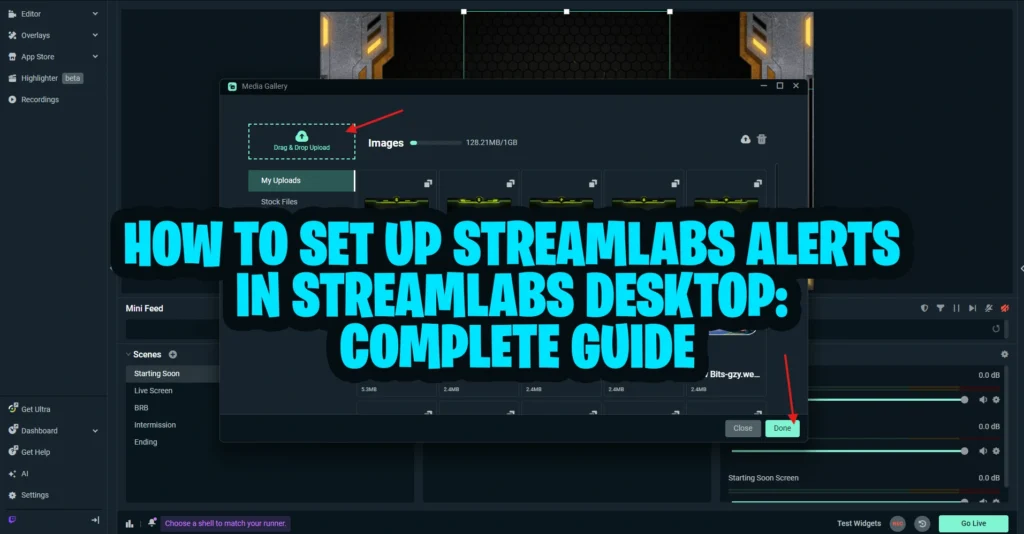
If you only need a focused tutorial for alerts, use this Streamlabs alerts setup guide. It is the best next step if you want to add alert boxes, test notifications, and make sure alerts display correctly.
For additional technical reference, Streamlabs also provides an official guide to setting up Streamlabs alerts, including Alert Box setup, premade themes, custom alerts, general alert settings, alert variations, testing, and adding alerts to Streamlabs Desktop or OBS.
If you are setting up more than alerts, such as overlays, transitions, scenes, and other visual assets, this Streamlabs setup guide can help you understand why stream alerts matter inside a complete manual setup workflow.
The best setup process is simple:
- Choose an alert style that matches your brand.
- Upload or connect the alert files inside your streaming software.
- Set placement and size carefully.
- Adjust sound volume.
- Test each alert type before going live.
- Watch a replay to see whether the alert feels natural during real content.
This keeps your alerts functional, polished, and easy for viewers to understand.
Choosing the Right Alert Style for Your Channel
The right alert style depends on your content, audience, and personality. A professional alert should feel like an extension of your stream identity.
| Channel Style | Recommended Alert Style | Why It Works |
|---|---|---|
| Competitive gaming | Neon, cyberpunk, esports, or high-impact alerts | Matches fast-paced energy and intense gameplay |
| Cozy or lofi streams | Soft, calm, pastel, or relaxed animated alerts | Supports a welcoming and comfortable atmosphere |
| Podcast or talk show streams | Minimal and clean alerts | Keeps the conversation clear without distraction |
| Anime or character-based channels | Expressive, illustrated, or character-inspired alerts | Strengthens personality and community identity |
| Variety streamers | Flexible branded alerts with balanced motion | Works across different types of content |
If you want to compare visual examples and styles, you can also explore our guide to animated stream alerts before choosing the best direction for your channel.
Common Stream Alert Mistakes to Avoid
Even good alerts can create problems if they are used incorrectly. Avoid these common mistakes.
Using Alerts That Do Not Match Your Branding
If your alerts look disconnected from your overlay, screens, and panels, your stream can feel less professional.
Making Alerts Too Loud
Loud alerts can shock viewers, interrupt your voice, or make the stream harder to watch. Keep alert sounds noticeable but controlled.
Letting Alerts Cover Important Content
Do not place alerts where they block gameplay, subtitles, captions, chat, or your camera.
Using Too Many Effects
More animation does not always mean better design. Too much movement can make the alert feel messy.
Never Testing Alerts
Broken alerts, missing sounds, wrong names, or bad placement can make a stream feel unprepared. Test before going live.
Ignoring Viewer Comfort
Alerts should feel exciting, not exhausting. If every interaction triggers a long animation, viewers may get distracted from the actual content.
Quick Checklist for Professional Stream Alerts
Before finalizing your alerts, use this checklist:
- Do the alerts match your stream branding?
- Is the text readable on desktop and mobile?
- Are the sounds balanced with your voice and game audio?
- Do the animations feel smooth instead of distracting?
- Are alerts placed away from important gameplay or camera areas?
- Have you tested follows, subs, donations, raids, and other alert types?
- Do alerts create natural moments for you to respond?
- Do they support the viewer experience instead of interrupting it?
If your alerts pass most of these checks, they are much more likely to help your channel feel polished and engaging.
Why Xpixel Studio Is a Good Choice for Stream Alerts
Xpixel Studio creates stream graphics for creators who want a more polished and consistent channel identity. That includes stream packages, overlays, transitions, emotes, badges, and alert designs made for Twitch, YouTube, and Kick creators.
For streamers who want professional stream alerts, the goal is not just to add movement to the screen. The goal is to create viewer recognition moments that fit the rest of the brand.
Xpixel Studio alert designs are useful for creators who want:
- Alerts that match a complete stream package
- More polished visuals than default notifications
- Consistent branding across overlays, screens, and transitions
- Designs that work for Twitch, YouTube, and Kick
- Styles such as cyberpunk, lofi, retro, dark, anime, minimal, or gaming-inspired themes
If you want ready-to-use alert designs for your stream, browse the stream alerts collection and choose a style that fits your channel identity.
Conclusion: Professional Stream Alerts Are More Than Notifications
Professional stream alerts are not just extras. They are part of how viewers interact with your channel.
Good alerts help viewers feel recognized. They create moments for interaction. They support follows, subscriptions, donations, raids, and community participation. They also strengthen your visual identity when they match your overlays, transitions, panels, and overall stream style.
The key is balance. Alerts should be clear, branded, and exciting without becoming distracting. They should support the stream experience, not interrupt it.
Whether you are a new streamer or a growing creator, professional stream alerts can help your channel feel more polished, more interactive, and more memorable. When used well, they turn simple notifications into moments your viewers actually notice.
FAQ About Professional Stream Alerts
What are professional stream alerts?
Professional stream alerts are branded notifications that appear during a live stream when viewers follow, subscribe, donate, raid, cheer, or complete another important action. They usually include custom visuals, animation, sound, and styling that matches the channel identity.
Why do stream alerts matter?
Stream alerts matter because they recognize viewer actions in real time. They can increase engagement, create community moments, support viewer retention, and make a channel feel more polished and interactive.
Do stream alerts help with engagement?
Yes. Stream alerts can help engagement by making follows, subscriptions, donations, raids, and other actions visible to the community. They also give the streamer a natural reason to respond and interact with viewers.
Are animated stream alerts better than static alerts?
Animated stream alerts can feel more exciting, but they are not always better. The best choice depends on your content style, branding, and viewer experience. Motion should add energy without distracting from the stream.
Can I use the same alerts on Twitch, YouTube, and Kick?
Yes. Many stream alerts can work across Twitch, YouTube, and Kick as long as they are compatible with your streaming software and properly configured for each platform’s alert events.
How do I set up Streamlabs alerts?
You can set up Streamlabs alerts by adding an Alert Box, connecting your platform account, customizing each alert type, uploading your alert assets, adjusting sound and placement, and testing the alerts before going live.
Our Products